
Affiliate Disclosure
This article may contain affiliate links. If you purchase through my link, I may earn a commission at no extra cost to you. This review is written to help you understand the product clearly before making a buying decision.
Review Basis / Transparency Note
This Browser Agent AI review is based on the official sales page and publicly available product information. I have not personally tested the full buyer dashboard, cloud browser environment, or all ready-made missions. Because of that, this review does not claim personal results, verified earnings, or guaranteed outcomes.
Also, this product is related to automation, lead generation, client work, and online business tasks. Results will vary depending on your niche, offer, traffic source, client outreach, skills, budget, and how well you use the tool.
Quick Verdict
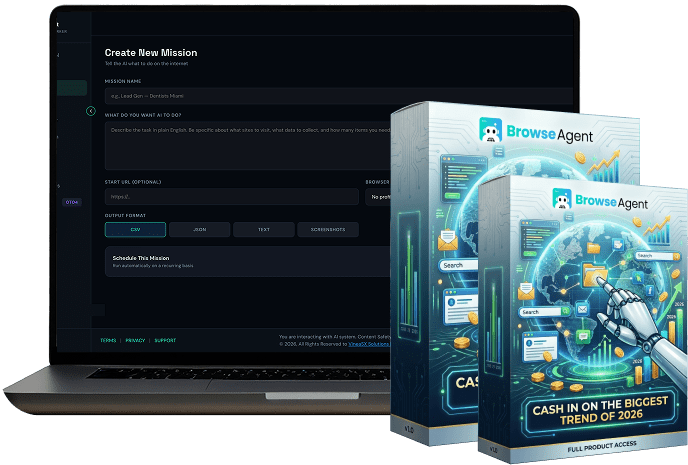
BrowseAgent, also searched as Browser Agent AI, looks interesting for marketers, freelancers, agencies, and beginners who want an AI tool that can perform browser-based tasks instead of only giving advice. The main promise is simple: type what you want, and the AI can open a real browser, click, type, research, collect data, post content, or complete repetitive web tasks.
The one-time pricing and 50+ ready-made missions make it attractive for beginners. However, buyers should be careful with income claims, check the final checkout page, and understand that automation still needs human guidance, review, and responsible use.
What Is Browser Agent AI?
Browser Agent AI, branded on the sales page as BrowseAgent, is an AI browser automation tool designed to complete web-based tasks from plain English commands. Instead of only writing content or giving suggestions, it claims to operate a real browser and perform actions like a human user.
For example, the sales page says you can ask it to find local business leads, research competitors, post content across social platforms, fill forms, collect data, apply to jobs, or prepare reports. The tool is positioned as a shortcut for repetitive online work that usually takes hours of manual clicking, copying, searching, and formatting.
This is different from a normal chatbot. A chatbot usually tells you what to do. BrowseAgent claims to do the work inside a browser. That makes it more like an AI worker or browser automation assistant.
For beginners in the USA, the appeal is clear. Many people want to start freelancing, run a side hustle, support local businesses, manage social content, or collect leads. But the boring part is execution. BrowseAgent is designed to reduce that manual workload.
How Does BrowseAgent Work?
The sales page presents the process in four simple steps.
First, you type what you want in plain English. You might ask it to find dentists in Miami, collect businesses from Google Maps, research competitors, post content to social media, or fill out forms.
Second, BrowseAgent opens a real browser and begins working. It can click, type, search, scroll, fill fields, and move through websites.
Third, the task runs in the cloud. That means your computer does not need to stay active the whole time. The page says you can watch the live browser feed or walk away while the system continues.
Fourth, the final result is delivered as usable output. That could be a lead list, research report, content, application, spreadsheet, or structured data.
The main selling point is convenience. Instead of building a technical automation with code, scripts, APIs, or browser extensions, users can start with ready-made missions and customize them.
Main Features of Browser Agent AI
BrowseAgent comes with a large feature list. Here are the most important features explained in simple terms.
Plain English commands:
You do not need to code. You type the task like a normal instruction, and the AI attempts to execute it.
Real browser automation:
The tool claims to use a real browser to click, type, scroll, search, and complete tasks.
50+ ready-made missions:
These missions are prebuilt workflows for lead generation, social media automation, competitor research, e-commerce research, jobs, outreach, SEO, data collection, and monitoring.
Cloud-based execution:
The sales page says tasks run in the cloud, so you do not need to keep your laptop open.
Live browser feed:
You can reportedly watch the AI complete tasks in real time.
Lead generation tools:
BrowseAgent includes missions for Google Maps lead collection, Yelp extraction, LinkedIn prospect research, Yellow Pages scraping, real estate leads, TripAdvisor business extraction, and more.
Social media automation:
It includes missions for multi-platform posting, LinkedIn publishing, Pinterest scheduling, Reddit posting, hashtag research, and comment management.
Competitor intelligence:
The tool can be used for competitor price tracking, ad scanning, tech stack detection, review research, social growth tracking, and content strategy analysis.
E-commerce research:
It includes missions for Amazon review analysis, AliExpress research, Shopify store research, eBay market scanning, and product trend discovery.
SEO and content automation:
The sales page mentions WordPress auto publishing, keyword rank tracking, broken link finding, meta tag auditing, sitemap extraction, and Search Console reporting.
Commercial rights:
The sales page says commercial rights are included, meaning users can use or sell the outputs, such as lead lists, reports, and content.
12 months of cloud hosting:
The FAQ section mentions one-time $37 pricing with 12 months of cloud hosting included.
Pricing and Value
The official sales page lists BrowseAgent at $37 for the Premium version. It also shows a $317 Bundle option.
| Offer | Listed Price | Notes |
|---|---|---|
| BrowseAgent Premium | $37 | One-time pricing, no monthly fee mentioned during launch |
| BrowseAgent Bundle | $317 | Bundle option listed on the sales page |
The sales page also says that one-time pricing may end after launch and that future users may pay monthly. This makes the launch offer look more attractive, but buyers should always check the final checkout page before purchasing.
One important thing to notice: the pricing box on the sales page appears to include some confusing or possibly mismatched bullet points, such as references to “SuperAffiliateAI Dashboard.” Because of that, you should not rely only on the sales page headline. Check the actual checkout page to confirm what is included before buying.
Refund Policy and Guarantee
The refund section needs careful attention.
The page says users can try it and email within 30 days for a full refund. It also mentions a 14-day guarantee in another section. The pricing box also shows “90-Day Money-Back Guarantee.” Because there are different guarantee statements on the page, you should verify the exact refund terms on the checkout page before buying.
Before purchasing, check:
- Exact refund period
- Whether refund applies to Premium only or also the Bundle
- Whether bonuses are refundable
- Who handles support
- Whether the guarantee is unconditional
- Whether the payment processor has separate refund rules
Do not buy only because of a guarantee statement. Always read the final terms.
Practical Use Cases
BrowseAgent may be useful for people who need repetitive browser work done faster.
A local marketing freelancer could use it to collect businesses from Google Maps, filter companies with poor reviews, and prepare outreach messages. This can help create prospect lists for web design, SEO, reputation management, or social media services.
A content creator could use it to publish content across multiple platforms. Instead of manually logging into each platform, the tool may help automate the posting process.
An e-commerce researcher could use it to analyze product listings, reviews, pricing, and competitor stores. This may help identify customer complaints, product gaps, or market opportunities.
A job seeker might use browser automation to organize job applications, collect company details, or speed up repetitive application tasks. However, users should avoid spamming employers or submitting low-quality applications.
An agency owner could use BrowseAgent for competitor research, SEO audits, review monitoring, and client reports. But the final output should still be checked manually before sending it to clients.
Pros and Cons
Pros
Beginner-friendly idea:
The tool is built around plain English commands, so it is easier than coding-based automation.
Large mission library:
The 50+ ready-made missions give users practical starting points.
Cloud-based workflow:
Running tasks in the cloud can save time and reduce the need to keep your computer active.
Commercial rights included:
This may help freelancers and agencies use the output for client work.
Useful for repetitive tasks:
Lead generation, research, posting, form filling, and reporting are good fits for browser automation.
One-time launch pricing:
The $37 front-end price is lower than many monthly automation tools.
Cons
Income claims need caution:
The sales page includes income-related examples, but no buyer should expect guaranteed results.
Refund language is inconsistent:
The page mentions different guarantee periods, so buyers should verify the final terms.
Automation may not work perfectly on every website:
Websites change layouts, use captchas, block automation, or require human judgment.
Login and data safety matter:
Any tool that stores logins or performs browser tasks should be used carefully.
Affiliate link not provided for this review:
If you are publishing this article, add your affiliate link to all CTA buttons before publishing.
Who Is Browser Agent AI For?
BrowseAgent may be a good fit for:
- Freelancers
- Local marketing agencies
- Affiliate marketers
- Social media managers
- SEO service providers
- E-commerce researchers
- Lead generation specialists
- Beginners who want to automate repetitive online tasks
- Small business owners who need basic web research and reporting
It is best for people who already understand what they want to accomplish but need help reducing manual work.
Who Should Avoid It?
You should avoid BrowseAgent if you want push-button income without effort. The tool may automate tasks, but it does not choose a profitable niche, close clients, write perfect offers, or guarantee sales.
You should also avoid it if you are uncomfortable giving any automation tool access to accounts, logins, or browser sessions. Even if the sales page mentions encryption, you should still use strong passwords, avoid sensitive accounts, and never allow automation on banking or payment pages.
It may also not be ideal for advanced developers who prefer open-source frameworks, custom APIs, Playwright scripts, or full control over automation infrastructure.
Common Concerns Before Buying
The first concern is reliability. Browser automation is powerful, but websites can change. Popups, captchas, login issues, rate limits, and page changes can break workflows. AI agents are more flexible than old scripts, but they are not perfect.
The second concern is compliance. Some websites do not allow scraping, automated posting, or mass actions. Users should respect platform rules and avoid spammy behavior.
The third concern is output quality. A lead list may still need cleaning. A social post may still need editing. A competitor report may still need fact-checking. Automation can reduce workload, but human review is still important.
The fourth concern is expectations. BrowseAgent can help you execute tasks faster, but it cannot guarantee that someone will buy your service, reply to your outreach, or pay for your report.
Alternatives to Browser Agent AI
If you want official or developer-focused browser automation, you can look at tools and frameworks like Browser Use, Browserbase, Playwright, Puppeteer, or other AI browser agent platforms. These may offer more control, but they usually require more technical setup.
If you want simple no-code automation, you might compare it with tools like Zapier, Make, Bardeen, or browser-based workflow automation platforms. These tools may be more stable for repeatable app workflows, but they may not offer the same plain-English browser control concept.
BrowseAgent’s advantage is that it packages browser automation for non-technical marketers and business users. The trade-off is that buyers should check actual limits, reliability, and refund terms carefully.
Final Recommendation
BrowseAgent is worth considering if you want a beginner-friendly AI browser agent that can help with lead generation, research, social posting, SEO checks, competitor monitoring, form filling, and other repetitive online tasks.
The strongest value is the combination of plain-English commands, cloud execution, 50+ ready-made missions, and commercial rights. For freelancers and small agencies, that could be useful if the tool performs as described.
However, you should not buy it expecting guaranteed income or perfect automation on every site. Use it as a productivity tool, not a magic business system. Check the checkout page, confirm the refund policy, and start with one practical task before depending on it for client delivery.
CTA Button Text:
Check Browser Agent AI Pricing
Button Link:
Add your affiliate link here. If you do not have an affiliate link, use the official sales page link.
Income Disclaimer
Browser Agent AI / BrowseAgent is related to automation, lead generation, client services, and online business. There is no guarantee that you will make money. Your results depend on your effort, niche, offer, traffic, outreach, skill level, client demand, and how well you use the tool.
FAQ
What is Browser Agent AI?
Browser Agent AI, branded as BrowseAgent on the sales page, is an AI browser automation tool that claims to complete online tasks by controlling a real browser.
How much does BrowseAgent cost?
The sales page lists BrowseAgent Premium at $37 and a Bundle option at $317. Always check the checkout page for the latest pricing.
Does BrowseAgent have a monthly fee?
The sales page says the launch offer is one-time pricing with no monthly fee and 12 months of cloud hosting included. It also says future users may pay monthly after launch.
Can beginners use Browser Agent AI?
Yes. The product is positioned for beginners and says no coding or technical setup is needed.
Does Browser Agent AI guarantee income?
No. The sales page includes an income disclaimer, and buyers should not expect guaranteed results. It is a tool for automation, not a guaranteed income system.